
Home / PTA Tax Calculator / PTA IMEI Check
PTA IMEI Check 2026: Is Your Phone Approved?
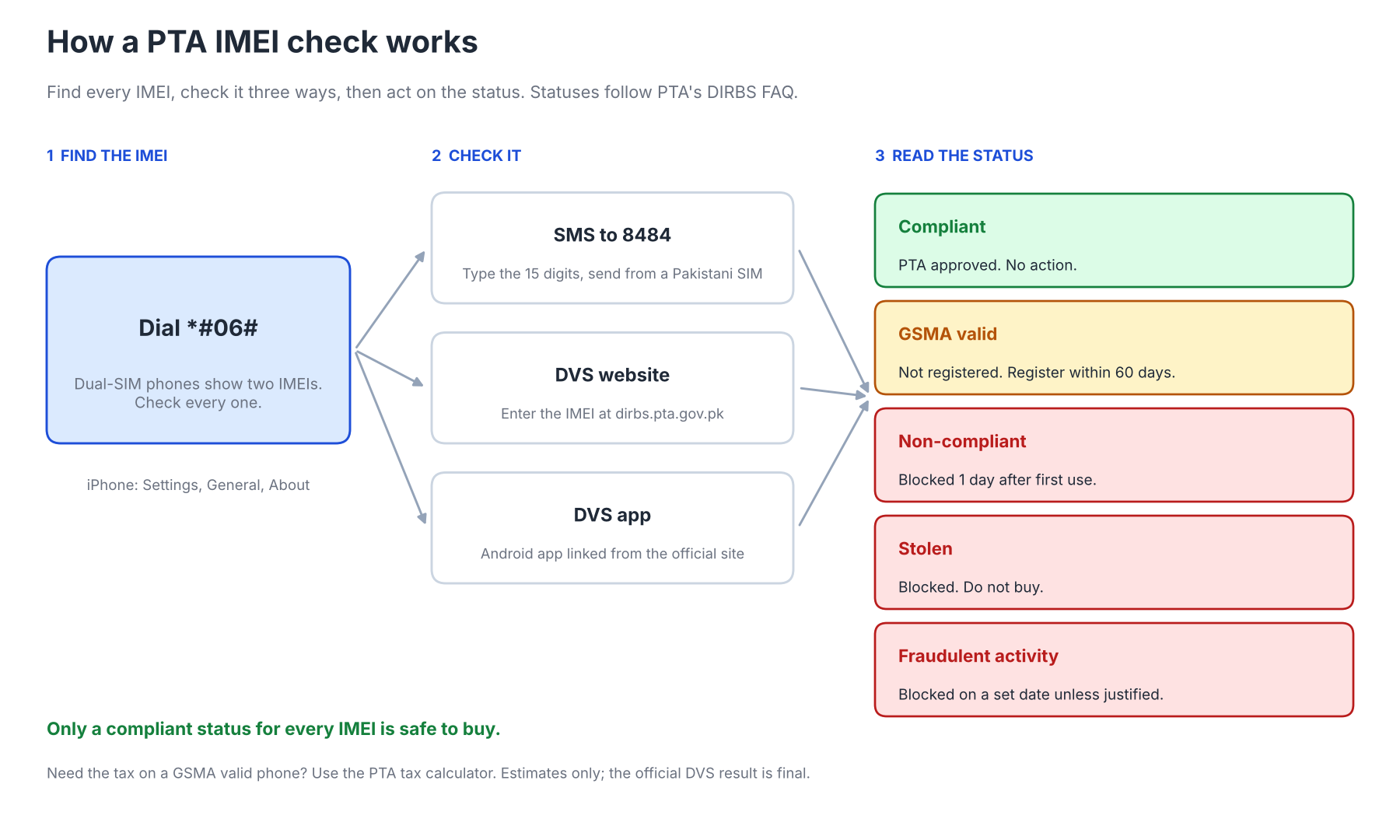
A PTA IMEI check tells you whether a phone is approved for Pakistani networks in under a minute. Dial *#06# to read the 15-digit IMEI, then send it by SMS to 8484 or enter it on the official DVS website or app. The reply shows one of five statuses: compliant, GSMA valid, non-compliant, stolen or fraudulent activity.
Run the check before you pay for a used phone, after you import one, and whenever a phone loses signal. A phone that shows GSMA valid has 60 days from first use to register. If the status says the phone still needs registration, the PTA tax calculator estimates the tax and the registration guide walks through the payment.
Check in 3 steps
Tap a step for the detail. The check itself happens on the official site.
1Dial *#06# to read the IMEI
The IMEI appears on screen. Dual-SIM and eSIM phones show two or more numbers, and you must check every one. On an iPhone, open Settings, then General, then About.
2Send it to 8484
Create a new message, type the 15-digit IMEI with no spaces and send it to 8484 from a Pakistani SIM. Send one message per IMEI. The reply names the status.
3Open the official DVS site
Go to dirbs.pta.gov.pk, enter the IMEI in the check box and submit. It needs data or Wi-Fi but no SMS balance.
Need the tax? Use the PTA tax calculator
This page does not run the check. It sends you to PTA’s own site.
What Is a PTA IMEI Check?
A PTA IMEI check reads a phone’s 15-digit IMEI against PTA’s DIRBS database and returns its registration status. The IMEI identifies one handset, and DIRBS links every IMEI to a status. The tax amount comes from a separate FBR page, covered below.
Pakistan charges duty and tax on imported phones, and registration ties the payment to the IMEI, so an unregistered phone is blocked in the end. That is why a used phone needs a check before you pay and a carried-in phone needs one after you land. Visitors can register one phone for 120 days without tax, and the registration guide explains how.
How to Do a PTA IMEI Check
You check a phone in three steps: find the IMEI with *#06#, submit it by SMS to 8484, on the DVS website or in the DVS app, and read the status. All three methods read the same DIRBS database. Pick the one that suits your signal, balance and screen.
Find your IMEI
Dial *#06# on the keypad and the IMEI appears on screen. Dual-SIM and eSIM phones show two or more numbers, and you must check every one. On an iPhone, open Settings, then General, then About. If the phone will not power on, read the IMEI from the box or the SIM tray.
PTA IMEI Check by SMS to 8484
Create a new message, type the 15-digit IMEI with no spaces and send it to 8484 from a Pakistani SIM. The reply names the status. Send one message per IMEI.
PTA IMEI Check on the DVS Website
Open the official site at dirbs.pta.gov.pk, enter the IMEI in the check box and submit. This DVS PTA check is the online route, and it needs data or Wi-Fi but no SMS balance. The site lists no fee for the check.
PTA IMEI Check With the DVS App
PTA publishes a DVS app for Android, and the DIRBS home page links to it with a QR code. Enter the IMEI and read the status on screen. Download it only from the link on the official site.
What Each PTA Status Means
DIRBS uses five statuses, and the wording on your screen may differ slightly. The cards give the meaning and action for each, following PTA’s FAQ. Compliant and GSMA valid are the two you will meet most often.
- Compliant
PTA approved or registered
What to do: Nothing, the phone works
- GSMA valid
Genuine IMEI, not registered
What to do: Register within 60 days of first use
- Non-compliant
Not registered and past the allowed window
What to do: Blocked after 1 day of first use, so register at once
- Stolen
Reported lost, stolen or misused
What to do: Blocked, so do not buy
- Fraudulent activity
IMEI flagged, for example a duplicate
What to do: Blocked on a set date unless you justify it through the PTA CMS portal
Treat any status other than compliant as a reason to pause. A blocked phone loses service on local networks. Buy only when every IMEI on the phone returns compliant.
PTA IMEI Check Examples With Interpretation
Four examples cover what buyers meet most often: a compliant phone, a GSMA valid import, a non-compliant phone and a dual-SIM phone with a bad IMEI. Each shows what the status means and what to do next. None uses a real phone.
A compliant used phone
You are buying a used iPhone and the check returns compliant for its only IMEI. That means PTA already approved or registered it, so no tax is due and the phone works on any network. Still compare the IMEI on the screen with the one on the box and the SIM tray before you pay.
A GSMA valid import
A phone you brought from abroad returns GSMA valid. The IMEI is genuine but PTA has not registered it, and the 60 days start when you first use it on a Pakistani network. If you insert a SIM on 1 March, the deadline falls around 30 April, so pay the tax before then.
A non-compliant phone that still works
A seller says the phone works, but the check returns non-compliant. PTA’s FAQ says such a device is blocked after 1 day of first use, so working today proves nothing. Walk away unless the seller registers it in front of you.
A dual-SIM phone with one bad IMEI
A dual-SIM phone has two IMEIs, and one returns an invalid GSMA TAC error. PTA’s FAQ says no further action is possible for a phone with a GSMA-invalid slot. Checking only the first IMEI would have missed this, which is why every number matters.
Check PTA Tax by IMEI
The DIRBS menu link Know Individual Mobile Duties Via FBR opens an FBR page where you type the IMEI and see the duty for that phone. A GSMA valid result is the case where you need it. The PTA tax calculator estimates the same tax from a customs value when you want to compare models before you buy, and the iPhone PTA tax tables price each Apple model.
The PSID you receive during registration is the final bill, and it stays valid for 7 days. Individuals can register five devices a calendar year. The registration guide covers the steps.
Buying a Used Phone: Checklist
Run these five checks in order before you hand over cash. Step three, the status check, matters most. Do it for every IMEI on the phone.
Walk away from any phone that fails a step. A non-compliant, stolen or fraudulent status ends in a blocked phone unless the owner registers it or justifies the flag. A receipt does not change a status.
Code Snippets: IMEI Validation in JavaScript
A valid IMEI has 15 digits and passes the Luhn check, so a form can reject typing mistakes before it sends anything. The function below strips spaces and dashes, tests the length and verifies the check digit. It runs in the browser and stores nothing.
The Luhn check cannot return a PTA status, because only DIRBS holds that data. Link the user to the official DVS for the real answer. Keep the status messages in a separate object so wording changes need one edit.
const STATUS = {
  compliant: "PTA approved. No action needed.",
  gsma_valid: "Genuine IMEI, not registered. Register within 60 days of first use.",
  non_compliant: "Blocked 1 day after first use. Register before you insert a SIM.",
  stolen: "Blocked as lost, stolen or misused. Do not buy.",
  fraud: "Flagged. Blocked on a set date unless justified through the PTA CMS portal."
};

function isValidImei(input) {
  const imei = String(input).replace(/[\s-]/g, "");
  if (!/^\d{15}$/.test(imei)) return false;
  let sum = 0;
  for (let i = 0; i < 15; i++) {
    let d = Number(imei[i]);
    if (i % 2 === 1) { d *= 2; if (d > 9) d -= 9; }
    sum += d;
  }
  return sum % 10 === 0;
}
// isValidImei("490154203237518")   -> true
// isValidImei("490154203237519")   -> false (check digit)
// isValidImei("49-015420-323751")  -> false (14 digits)
Security: Avoid IMEI Scams
Never pay anyone who promises to bypass PTA registration, patch an IMEI or unblock a phone for a fee. PTA's registration runs only through its own system, and changing an IMEI is illegal. Pay tax only against a PSID generated for your own IMEI.
Use only the official DVS site and the app linked from it. Fake checker apps and sites can harvest your data, and the real check needs nothing but the IMEI. A page that asks for payment before showing a status is not the official tool.
Common PTA IMEI Check Errors
Most failed checks come from a typing slip or a missing second IMEI. The table pairs each symptom with its cause and fix. Check the digits before you suspect the phone.
Symptom | Likely cause | What to do |
|---|---|---|
No reply from 8484 | Wrong digits, or no network | Resend with 15 digits |
Invalid GSMA TAC | The IMEI is not GSMA-issued | Do not buy the phone |
Two different results | Dual-SIM phone with two IMEIs | Act on the worse status |
Status shows GSMA valid | Not registered yet | Register within 60 days |
Check page will not load | Site busy or poor signal | Try the app or SMS |
A mismatch between the screen IMEI and the box IMEI is the most serious sign. It can mean a replaced board or a cloned number. Treat it as a failed check.
SMS, Website and App Compared
The three methods return the same status, so choose by convenience. The table shows what each needs and where it fits. Use two methods if the result looks odd.
Method | What you need | Best for |
|---|---|---|
SMS to 8484 | A Pakistani SIM with some balance | Quick check at a shop |
DVS website | Internet and a browser | Checking from a laptop |
DVS app | An Android phone and internet | Repeat checks on your own phone |
The website and the app need no SMS balance, which helps if the phone has no credit. The SMS route works with no data connection. Both online routes show the same status as the SMS reply.
PTA Approved Check: Frequently Asked Questions
These answers follow PTA's DIRBS FAQ. Limits and fees can change, so confirm on the official site first. Each answer gives the rule first and the action second.
Conclusion
A PTA IMEI check takes a minute and decides whether a phone is safe to buy. Check every IMEI by SMS to 8484, on the DVS website or in the app, and accept only a compliant status. Repeat the steps for every IMEI, because you must check PTA approved status for each slot. If the phone shows GSMA valid, register it within 60 days and estimate the tax first.
Rules and limits come from PTA's DIRBS FAQ, so recheck them before a large purchase. The tax calculator and the registration guide cover the next steps, and the Pakistan tax calculators hub lists the rest. Keep the PSID safe until payment clears.