
Home / PTA Tax Calculator / PTA Mobile Registration
PTA Mobile Registration 2026: Online Steps and Fees
PTA mobile registration lets an imported phone keep working on Pakistani networks after its grace period ends. You create a DRS account, enter your IMEI and SIM details, pay the tax through a PSID and wait for approval. Most shop-bought phones are already registered, so this page is for imported, gifted and carried phones. PTA’s FAQ lists no registration fee, and the tax is set by FBR.
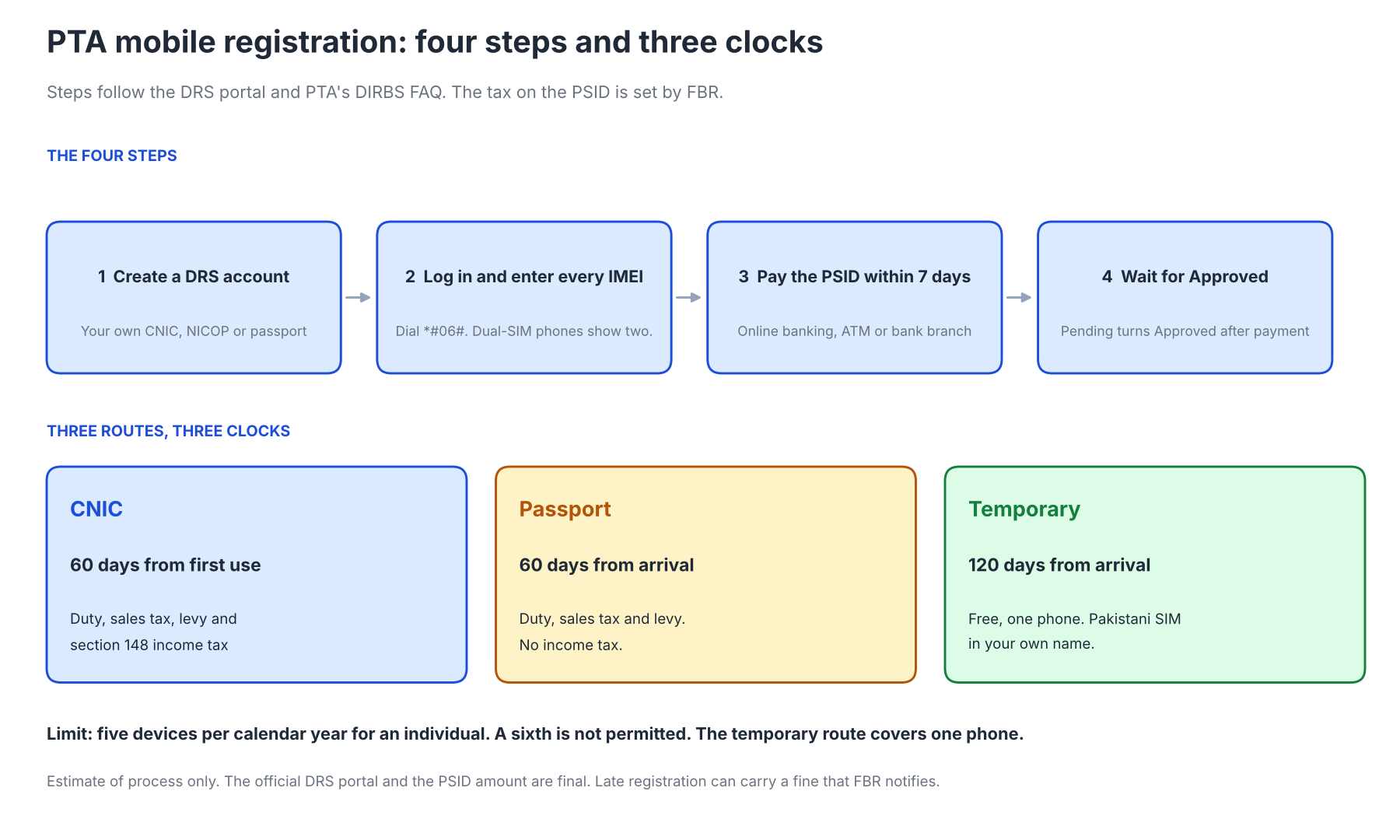
Residents register on a CNIC, arrivals can register on a passport within 60 days, and overseas Pakistanis and foreign visitors get a free temporary route for 120 days. An individual can register up to five devices a calendar year. The PSID issued when you submit must be paid within 7 days.
Register a phone in 4 steps
- Sign up on DRS.
- Enter every IMEI and your SIM.
- Pay the PSID within 7 days.
- Wait for Approved.
Need the tax first? Use the PTA tax calculator.
Who Needs PTA Mobile Registration
A phone needs registration when its IMEI is not on the PTA compliant list, which covers imported, gifted, courier-delivered and some second-hand phones. A phone bought with a PTA approved status needs nothing more. The PTA IMEI check tells you which case you are in.
PTA’s DIRBS FAQ sets two clocks. A GSMA valid phone must be registered within 60 days of first use, and a non-compliant phone is blocked after 1 day. Visitors who register on a passport have 60 days from arrival.
PTA Mobile Registration Online: Step by Step
You register online in four steps: create a DRS account, log in and enter every IMEI, pay the PSID within 7 days and wait for Approved. The DRS portal at dirbs.pta.gov.pk/drs serves local, overseas and dual nationals, foreign nationals and commercial importers. You can also register by dialing *8484# from a local SIM or at an operator service centre. Older guides also mention airport desks, franchises and an app, so confirm any other channel with PTA first.
Step 1: Create a DRS account
Choose the user type, then enter your name, 13-digit CNIC or NICOP, contact number, operator, region, city and address. Use your own CNIC, because PTA’s terms require the applicant’s own valid credentials. Someone else’s CNIC counts as misuse and can be reported on the PTA complaint portal.
Step 2: PTA Mobile Registration Login and Application
The login accepts your email, CNIC or passport number with the password. Start a new application and enter every IMEI, which you can read by dialing *#06#. The portal returns the tax amount and a PSID once you submit. A dual-SIM phone has two IMEIs, and both go on the same application.
Step 3: Pay the PSID within 7 days
The PSID carries the FBR customs duty and taxes and stays valid for 7 days. Pay it through online banking, an ATM or a bank branch, or FBR deletes it. Check the amount against the PTA tax calculator first.
Step 4: Wait for approval
The status moves from Pending to Approved once FBR confirms the payment through 1-Link, and PTA sends registered IMEIs to operators every hour. The FAQ gives no fixed number of hours, so allow a day before you chase it. Use the CMS portal if it stalls.
Passport, CNIC and Temporary Registration
The CNIC route suits residents who keep the phone, and it carries section 148 income tax. Passport holders register within 60 days of arrival using a SIM issued on their passport or CNIC. That route has no income tax, so it saves between Rs 100 and Rs 11,500 depending on the phone’s value.
Overseas Pakistanis and foreign nationals can register one phone for up to 120 days without tax. The 120 days start on the arrival date confirmed by FIA data, so applying 30 days late leaves 90, and the Pakistani SIM must be in your own name. You apply again on every visit, and a phone gifted or sold in Pakistan needs a normal registration.
Device Limits: Five Phones a Year
The PTA device register caps an individual at five devices a calendar year, and a sixth is not permitted. The temporary route is separate and covers one phone. There is no free first device, because FBR withdrew the baggage exemption as of 30 June 2019.
Tap the dots to count the phones you have already registered this year.
4 registrations left this year
Some guides say one phone a year is duty-free, but the FAQ says every registered device attracts duty. The single free phone belongs only to the temporary route. Count your registrations before you buy a fifth phone abroad.
PTA Tax Payment Online
7-day countdown- 1Get the PSIDShown by DRS after you submit the IMEIs.
- 2Pay by bank or appOnline banking, an ATM or a bank branch.
- 3Wait for confirmationFBR confirms through 1-Link, then the status moves to Approved.
The FAQ lists no PTA registration fee, and the amount on your PSID is FBR customs duty and tax. It depends on the phone’s customs value, not on its storage or the price you paid. Use the PTA tax calculator for any phone and the iPhone PTA tax list for iPhones.
If the PSID in your bank app differs from the one on DIRBS, check your SMS or email and visit the nearest FBR customs house if it still differs. If you paid but the status shows not registered, ask your bank or FBR. Late registration can carry a fine that FBR notifies.
PTA Mobile Registration for a Blocked Phone
A phone PTA has blocked as non-compliant is registered through the same DRS steps. Pay the PSID, wait for Approved and confirm the status with a PTA IMEI check. A stolen or fraudulent-activity flag is different, because tax will not clear it and the CMS portal is the route to dispute it.
PTA Mobile Registration Examples With Interpretation
Three examples show the clocks that matter most: a passport applicant, an overseas Pakistani on the temporary route and a gifted phone. Dates use 2026, and none describes a real phone. Each clock starts from arrival, first use or PSID issue.
A passport registration on day 19
A traveller lands on 1 March and applies with a passport on 20 March. The PSID expires on 27 March, while the passport route would have run until 30 April. The 7-day PSID was the real deadline, so the traveller should pay within a few days.
A temporary registration for an overseas Pakistani
An overseas Pakistani arrives on 1 March and applies for temporary registration on 31 March. The phone is covered until 29 June, so only 90 of the 120 days remain. A longer stay needs a normal registration with tax before that date.
A gifted phone registered on day 70
A gifted phone is first used on 1 March, and the owner applies on 10 May, 70 days later. The portal returns a not eligible for tax exemption error because the 60 days ended on 30 April. Registration is still the way to keep the phone connected, and a late fine may apply.
Code Snippets: PTA Deadline Calculator in JavaScript
This helper works out each PTA window from the arrival, first use and PSID dates. It uses UTC dates, so time zones cannot shift a deadline. Keep the windows in one place, because PTA can change them.
The windows come from PTA’s FAQ: 60 days, 120 days, 7 days and five devices a year. The helper estimates dates only. DIRBS decides the real status.
// PTA windows from the DIRBS FAQ: 60 days (passport / first use), 120 days
// (temporary, from arrival), 7 days (PSID), 5 devices per calendar year.
const addDays = (isoDate, n) => {
  const d = new Date(isoDate + "T00:00:00Z");   // dates are UTC, no time zone drift
  d.setUTCDate(d.getUTCDate() + n);
  return d.toISOString().slice(0, 10);
};

function ptaDeadlines({ arrival, firstUse, psidDate, registeredThisYear = 0 }) {
  const out = {};
  if (arrival)  out.passportRouteEnds = addDays(arrival, 60);
  if (arrival)  out.temporaryEnds = addDays(arrival, 120);
  if (firstUse) out.registerBy = addDays(firstUse, 60);
  if (psidDate) out.psidExpires = addDays(psidDate, 7);
  out.devicesLeftThisYear = Math.max(0, 5 - registeredThisYear);
  return out;
}
// ptaDeadlines({ arrival: "2026-03-01", psidDate: "2026-03-20" })
//   -> { passportRouteEnds: "2026-04-30", temporaryEnds: "2026-06-29",
//        psidExpires: "2026-03-27", devicesLeftThisYear: 5 }
Security: Avoid Registration Scams
Never share your password, OTP or PSID with an agent. Register only on the official DRS portal or through *8484#, and pay only against a PSID generated for your own IMEI. An agent who offers registration without tax is offering what PTA’s terms do not allow.
PTA may block any device found cloned, duplicated or registered with fraudulent details. A site that asks for a card number to show a status is not the official tool. If someone else used your CNIC, file a Misuse of Credentials complaint on the CMS portal.
Common PTA Mobile Registration Errors
Typing errors, missed dates, an unconfirmed payment and a SIM that is not in your name explain the errors below. The table lists the errors PTA’s FAQ describes and the fix for each. Check the digits before you suspect the system.
Symptom | Likely cause | What to do |
|---|---|---|
Not eligible for tax exemption | Registered more than 60 days after activation | Register and pay, or file a CMS complaint with documents |
PSID expired | Not paid within 7 days | Reapply with the same IMEIs |
Paid but still not registered | FBR has not confirmed the payment | Ask your bank or FBR, and wait for the status to change |
IMEI already exists | Phone is compliant, tax is pending or a multi-SIM check failed | Check by SMS to 8484 or delete the pending application |
Foreign SIM rejected | Temporary route needs a Pakistani SIM in your name | Get a local SIM in your name, then register |
A wrong IMEI on a pending application is easy to fix, because you delete it and reapply. After approval the same mistake needs a CMS complaint and manufacturer verification. You can delete an application up to five times.
PTA Registration Routes Compared
The table compares the three routes by who they suit, how long you have and what you pay. The tax lines follow the PTA tax calculator for 2026-27. Choose before you create an account.
Route | Best for | Time limit | Tax | Devices |
|---|---|---|---|---|
CNIC | Residents keeping the phone | 60 days from first use | Duty, sales tax, levy and section 148 income tax | Up to 5 a year |
Passport | Arrivals from abroad | 60 days from arrival | Duty, sales tax and levy, no income tax | Up to 5 a year |
Temporary | Overseas Pakistanis and foreigners | 120 days from arrival | None | 1 phone |
The temporary route costs nothing but ends on a fixed date, so it suits a visit. The passport route suits a phone you keep, inside 60 days of arrival. The CNIC route is the default for everyone else.
PTA Registration FAQs
These answers follow PTA’s DIRBS FAQ. Rules can change, so confirm on the official portal first. Each answer gives the rule first and the action second.
Conclusion
PTA mobile registration comes down to your own credentials, every IMEI, a PSID paid within 7 days and a date inside the right window. Choose the CNIC, passport or temporary route first, because the route sets the tax and the deadline. Individuals can register five devices a calendar year.
Rules come from PTA’s DIRBS FAQ, so recheck them before a large purchase abroad. The tax calculator and the PTA IMEI check cover the steps on either side, and the Pakistan tax calculators hub lists the rest. Keep the PSID receipt until the status shows Approved.
Official sources
The rules and limits come from these sources. Check them against the live pages. PTA’s wording is the only binding version.